BUILT FOR PROP FIRM TRADERS · TRADOVATE · RITHMIC · TOPSTEPX
Copy Every Trade. Across Every Prop Account.
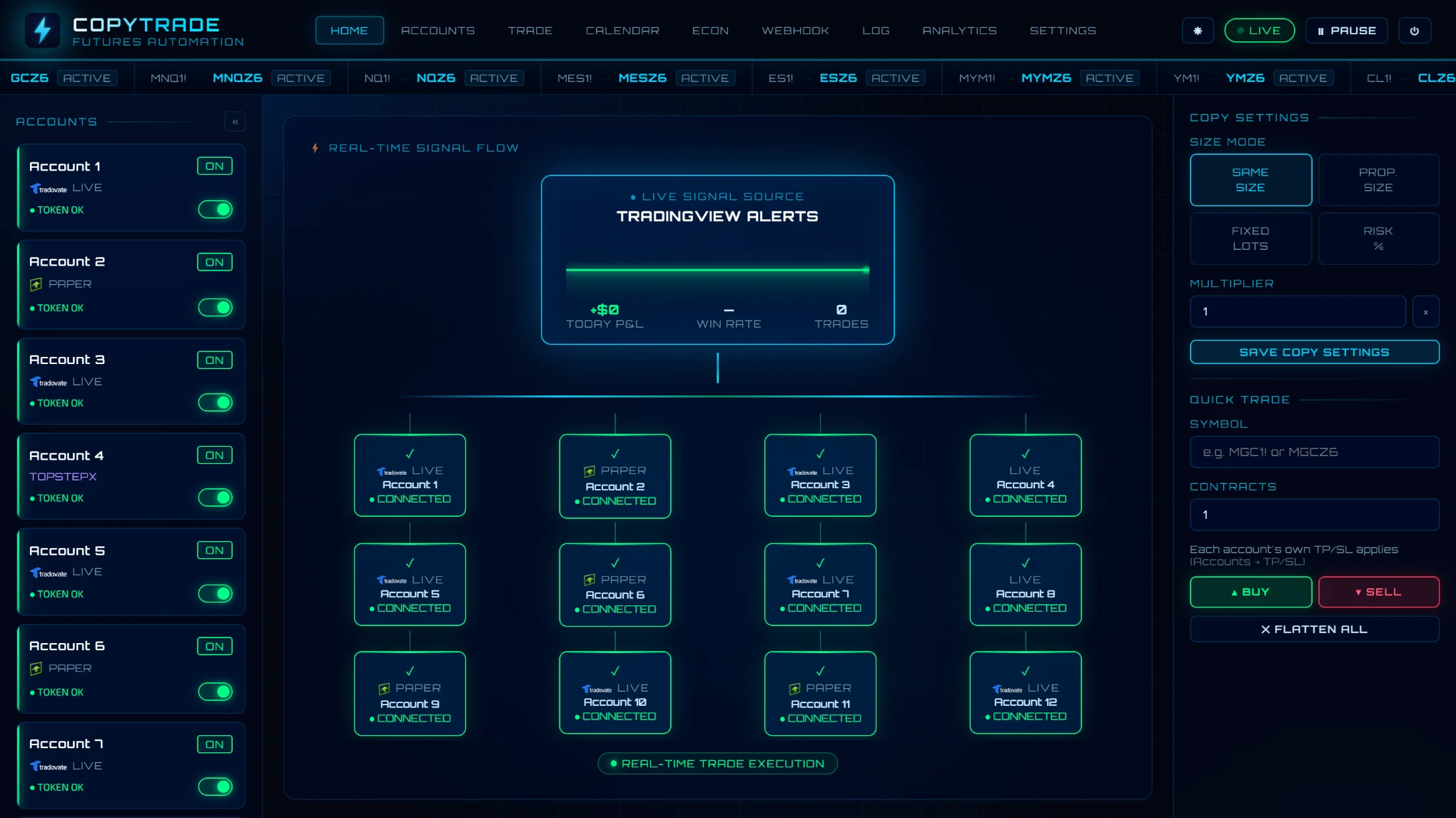
One TradingView alert trades all your Tradovate, Rithmic and TopstepX accounts. Each one gets its stop, TP1 and TP2 placed at the broker, and its stop moved to breakeven when TP1 fills. You can set daily limits, a drawdown guard and a news pause for each account.
The Real Work Starts After Entry. We Manage the Full Lifecycle.
Your stop loss and take-profit orders are placed at your broker the moment you enter, and CopyTrade moves your stop to breakeven after TP1 — automatically, on every account.
📡
SIGNAL
TradingView fires webhook
⚡
ENTRY
Every account enters, stop placed
🎯
TP1 HIT
Partial exit on all accounts
🔒
BREAKEVEN
Stop moved automatically
✅
TP2 / EXIT
Full close, trade complete
FEATURES
Built for Prop Traders and Live Account Traders
Everything you need to run several prop firm accounts from TradingView — place every trade, set limits on every account, and see what happened on each one.
EXECUTE
One alert, every account — placed and managed at the broker.
📊
Full Trade Lifecycle Management
TP1 partial exits, automatic breakeven stop, TP2 full close, and stop loss — your stop and take-profit orders sit at your broker from the moment you enter. CopyTrade then moves the stop to breakeven after TP1, which needs CopyTrade running; the orders already at the broker don't.
⚡
TradingView Webhooks
Connect any strategy, or a script that sends its own alert message. Set the stop and targets in points or dollars, and size each account by risk — a % of its balance or a dollar amount. Editable message template built into the dashboard.
🧭
Run Several Strategies
Put accounts in groups and add the group to each strategy's alert. Your NQ scalper trades only its accounts and your gold strategy only its own — one webhook, one dashboard. Alerts without a group trade every account.
🔄
Per-Account Control
Set a multiplier, a direction and trading hours per account. Account A trades 1x all session, Account B 2x only from 9:30 to 11:30 ET, Account C reverses the signal — all from one webhook.
🔀
Symbol Conversion
Trade NQ1! on TradingView but execute as MNQ1! on your broker. Set conversion rules once — applied to every signal automatically.
🎯
One Position at a Time
Already in a trade on that market? By default a same-direction alert is ignored and your trade is left alone, so there's no accidental doubling up. An opposite alert closes it, then opens the new direction. Want to scale in? Let chosen accounts add up to 5 trades, each with its own stop and targets, once the earlier ones have their stops at breakeven.
RISK CONTROLS
Limits and pauses you set for each account.
⚠️
Prop Firm Risk Engine
Auto-block trading when a daily loss limit or max trade count is hit. Give each account its own daily profit target and loss limit — reach one and that account's open trades are closed and it stops for the day. Resets each trading day automatically.
🛡️
Drawdown Guard
Enter your firm's max drawdown and how it trails — intraday, end of day or static. CopyTrade follows the threshold from your broker's balance and stops new trades, or closes them, before the account gets there.
🔌
Not-Connected Alerts
Fifteen minutes before each session opens, every account is reconnected. Any that can't be are emailed and pushed to you — so you find out before an alert fails, not after.
⏸️
High-Impact News Pause
Optionally stop new trades for the minutes you choose before and after the US jobs report, CPI, PPI, GDP, PCE, retail sales and Fed rate decisions — timed from the government's official release schedules. Open positions keep their stop-loss and targets — or have CopyTrade close its open trades when the pause starts. Trading resumes on its own.
📏
Max Contract Size
Set a maximum number of contracts and no alert can place more, even if the strategy asks for it.
🔐
Security Built In
Broker logins and tokens encrypted with AES-256, two-factor login on every plan, an email for new-device logins and every security change, an account activity log, and an option to accept alerts only from TradingView. Tradovate connects through Tradovate's own login, so CopyTrade never sees your Tradovate password.
STAY INFORMED
Know what happened on every account, wherever you are.
🏥
Live Account Overview
Every account's connection status and balance, open positions with live P&L, and a meter showing how much of today's loss limit you've used — on one screen.
📥
Alert Inbox
Every alert your webhook receives, with what each account did and why — filled, skipped outside its trading hours, blocked by a daily limit or a news pause, or ignored as a repeat. If an alert fired in TradingView but isn't there, it never reached CopyTrade.
📱
Mobile App & Push Alerts
Install CopyTrade on your phone's home screen. Monitor positions, place manual trades and pause copying from anywhere — and get a push alert if a position loses its stop, a daily limit is hit, a news pause starts, or an account isn't connected before the open — plus, if you want them, a push for every fill.
📈
Strategy Analytics
Win rate, avg win/loss, risk:reward, max drawdown, profit factor — broken down by symbol, day of week, and hour of day.
🗓
Monthly P&L Calendar
Green/red calendar showing every trading day. Click any day to see the full trade breakdown. Journal and tag every trade.
INTEGRATIONS
Works With Your Broker & Signal Source
CopyTrade connects your TradingView strategies directly to your funded and live accounts — no manual copying required.
SIGNAL SOURCE
TradingView
Pine Script strategies · Alerts · Webhooks
✓ SUPPORTED
↓ Signals copy to all your switched-on accounts
SUPPORTED BROKERS & PROP FIRMS
T
Tradovate
PROP FIRMS & PERSONAL
✓ LIVE
All Tradovate-supported prop firms — Tradeify, Apex, Lucid and more — plus personal Tradovate accounts. Connect with your normal Tradovate login.
MGC · MNQ · MES · MYMNo extra fee
X
TopstepX
PROP FIRM
✓ LIVE
Topstep accounts via ProjectX API. Topstep doesn't allow API trading on Live Funded accounts.
ProjectX APIAPI: $29/mo · 50% off with code topstep
⚡
Apex Trader Funding
VIA TRADOVATE OR RITHMIC
✓ LIVE
Apex accounts run on Tradovate or Rithmic — connect yours the same way as any other Tradovate or Rithmic account.
TradovateRithmic
Rithmic
INFRASTRUCTURE
✓ LIVE
All Rithmic-supported prop firms — MyFundedFutures, Take Profit Trader, Bulenox, TradeDay, Alpha Futures and more. Connect with the Rithmic login your prop firm gives you — no extra fee.
⚠ Connecting is not the same as permitted. Each firm sets its own rules on automated trading and on copying between accounts, and changes them. Check your firm's current rules for your account type before you connect.
CopyTrade is independent software. It is not affiliated with, endorsed by or sponsored by TradingView, Tradovate, NinjaTrader, Rithmic, Topstep, ProjectX or any prop firm named on this site. Their names and logos belong to their owners and are used only to say which accounts CopyTrade can connect to.
Broker costs: Tradovate and Rithmic accounts, prop firm and personal, connect with your normal login —
no extra fee. TopstepX needs a ProjectX API subscription —
$29/mo, or $14.50/mo with code topstep — paid to ProjectX.
EXAMPLE TOTAL MONTHLY COST
STARTER + TRADOVATE OR RITHMIC
$35/mo
UP TO 5 ACCOUNTS · NO EXTRA BROKER FEE
PRO + TOPSTEPX API
$59.50/mo
UNLIMITED ACCOUNTS · WITH CODE TOPSTEP
CANCEL ANYTIME · NO CONTRACTS · INSTANT ACCESS
Launch pricing: subscribe during the launch period and keep this price for as long as your subscription stays active. See the Terms of Service for details.
FAQ
Common Questions
Everything you need to know before signing up.
Does this work with prop firm accounts?▼
Yes. Prop firms on Tradovate (Tradeify, Apex, Lucid and more) connect with your normal Tradovate login, with no extra fee. Prop firms on Rithmic (MyFundedFutures, Take Profit Trader, Bulenox, Apex and more) connect with the Rithmic login your firm gives you. Topstep accounts connect through TopstepX with a ProjectX API key. Always check that your prop firm allows automated trading.
Do I need to be a developer to use this?▼
Not at all. If you can set up a TradingView alert, you can use CopyTrade. The setup guides walk you through every step in plain language, and most setups take just a few minutes.
Are my login details stored securely?▼
Yes. Broker passwords, API keys and sign-in tokens are encrypted with AES-256 before they're stored, and two-factor login is available on every plan. Tradovate accounts connect through Tradovate's own login page, so CopyTrade never sees your Tradovate password.
What happens if the server goes down during a trade?▼
Your stop loss and take-profit orders are placed at your broker the moment you enter, so they stay in place even if CopyTrade is offline. Only the move to breakeven after TP1 needs CopyTrade running. CopyTrade runs 24/7 and restarts automatically; copytrade.trade/status shows whether it's up right now.
Can I try it before paying?▼
Yes — 7-day free trial, no credit card required.
How fast does the copy execute?▼
Every account gets its order at the same time, as soon as TradingView's alert reaches CopyTrade. Accounts that share one Rithmic login go one after another on that login. TradingView itself can take a few seconds to send an alert.
Can I run more than one strategy?▼
Yes. Put accounts in groups on the Accounts page and add the group to each strategy's alert message, for example "group": "nq-scalper". Each strategy then trades only its own accounts, all from one webhook. Alerts without a group trade every switched-on account.
Can it avoid trading during big news releases?▼
Yes. Switch on the news pause and CopyTrade stops new trades for the minutes you choose before and after the US jobs report, CPI, PPI, GDP, PCE, retail sales and Fed rate decisions. Open positions keep their stops, or CopyTrade can close its open trades when the pause starts. Trading resumes on its own.
Can each account use its own size and trading hours?▼
Yes. Each account can have its own multiplier, trade the opposite direction, and have its own trading hours in Eastern Time, for example only from 9:30 to 11:30 ET. Outside an account's hours, alerts are skipped for that account only.
ABOUT
Built By a Futures Trader
CopyTrade was built by a futures trader who got tired of missing fills while manually entering the same trade on 3 prop firm accounts. Missing TP1 on two of them. Forgetting to move stops to breakeven. We built the tool we wished existed.
CopyTrade LLC is registered in Wyoming, USA. For any questions, concerns, or issues contact us directly at [email protected] — we respond to every message.
It's a simple, reliable automation layer purpose-built for futures traders running TradingView strategies across multiple funded and live accounts. Nothing more, nothing less.
 MyFundedFutures
 TradeDay
 Alpha Futures
 Lucid Trading
 Bulenox
 DayTraders
 Hola Prime
 Elite Trader Funding
